 Perchy

The short answer
On most Macs, a Dynamic Island is a small black pill that a notch app draws at the top of the screen: it shows what is happening (a song, charging, AirPods connecting) and opens into a panel when you point at it. Apple has announced its own Dynamic Island for one model, the new MacBook Pro with PROLED XDR Display (October 28, 2026). On notched MacBooks, iMacs, Mac minis and external monitors, a notch app such as Perchy (our app) draws one. In Perchy you turn it on per display in Settings › General › Displays.
What a Dynamic Island is on a Mac
#Dynamic Island is Apple’s name for the pill-shaped area at the top of recent iPhones that grows to show timers, music, calls and other live activity. On October 28, 2026, Apple announced that it comes to the Mac with the new MacBook Pro with PROLED XDR Display, as the home for Spotlight, Live Activities and Siri AI. Apple’s announcement covers that model and does not mention other Macs.
Every other Mac has either a notch, the camera housing at the top of recent MacBook screens, or a plain top edge, as on an iMac, a Mac mini or an external monitor. That is where notch apps come in. This guide is written by the team behind Perchy, one of those apps, and uses it for the set-up steps.
How notch apps draw an island where there is no notch
#A notch app places a small black window at the top center of the screen, above the menu bar. On a MacBook with a notch, that window wraps around the camera housing, so the notch itself seems to grow. On a display without a notch there is nothing to wrap, so the app draws the shape itself, in one of two styles:
- Notch: a black tab attached to the top edge, like the one on a MacBook. It looks the same on every screen.
- Dynamic Island: a floating pill a few points below the top edge, with even rounded corners, like the iPhone’s. On a notched MacBook it sits just under the camera housing.


Both styles behave the same: closed, they show short activity; point at them and they open into a panel with the app’s modules; move away and they close again.
Set up a Dynamic Island with Perchy
#- Download Perchy and drag it to Applications. It needs macOS 14 or later and works on any Mac, notch or not.
- Open Settings from the gear in the open notch, or from Perchy’s menu bar icon.
- Go to General › Displays. Each connected display has its own row with a menu: Notch, Dynamic Island or Hide.
- Choose Dynamic Island for the display you want. The change applies at once, with no restart.
Displays you have not set keep the notch: on the display with a camera notch, or on the main display when none has one. With a MacBook and other displays connected, Only on the built-in display hides Perchy on the others while the built-in screen is on; with the lid closed, your choices for each display apply.
Perchy Free shows on one display: the one with the notch, or else your main one. Perchy Pro shows on every display, each with its own style. Every new Mac gets 24 hours of Pro to try it, and Pro is $14.99, paid once, for 2 Macs (the launch price, then $19.99).
Size and position
#Go to Settings › General › Size & position. A switch at the top picks which style you are adjusting: Notch or Dynamic Island.
- Dynamic Island: pick the Display to adjust, then set its Vertical position (how far below its default place it floats, or up to the top edge) and its Height. Each display keeps its own size and position, and the island follows the sliders as you drag.
- Notch: Closed notch size fits the closed notch to your Mac’s camera or menu bar, with Height and Width sliders that show the suggested size in points. Use Suggested Size puts it back.
On an external monitor, the island starts in the middle of the menu bar and reaches a little below it, sized to that display’s menu bar.
What shows in it
#Closed, Perchy’s island shows what changes as it happens: the song that is playing, charging, volume and brightness, AirPods connecting and, on Pro, timers from the Clock app. Settings › General › Closed notch shows picks whether the closed island shows music, prices, or music while something plays and prices otherwise.
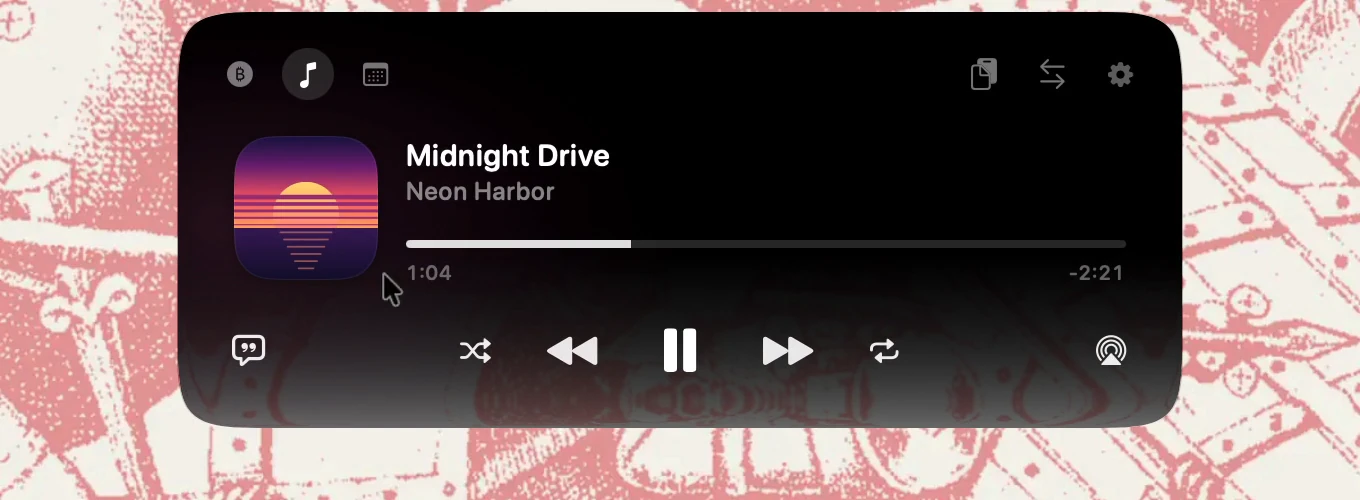
Open, it has the same modules as the notch:
- Markets: crypto and stock prices with charts and price alerts.
- Music with artwork and controls, a calendar with a Join button, clipboard history and a Files Tray.
- On Pro, a converter for your coins and 30 currencies.
Hover over it to open it, or click it. A global shortcut, set in Settings › General, can open it too. For the feature overview, see a Dynamic Island-style island for your Mac, and for how other notch apps handle displays without a notch, see the comparison or our roundup of Mac notch apps.
Questions
#Does macOS have a Dynamic Island?
On one model. Apple announced on October 28, 2026 that the Dynamic Island comes to the Mac with its new MacBook Pro with PROLED XDR Display, as the home for Spotlight, Live Activities and Siri AI. Apple’s announcement does not mention other Macs. On those, a notch app such as Perchy draws an island of its own.
Can I have a Dynamic Island on an external monitor?
Yes, with a notch app that supports external displays. In Perchy, open Settings › General › Displays and choose Dynamic Island for that display. Perchy Free shows on one display; Perchy Pro on every display.
Can my MacBook keep its notch while the monitor gets an island?
Yes. In Perchy the style is chosen per display, so the built-in screen can stay Notch while the external one shows Dynamic Island. Showing Perchy on both needs Pro.
Will Perchy cover my menu bar icons?
Perchy sits in the middle of the menu bar. If you allow Accessibility, it keeps its closed notch clear of the menu bar icons beside it; without that permission, the notch may cover icons next to it.
Is Perchy made by Apple?
No. Dynamic Island is Apple’s name for the feature on the iPhone and the new MacBook Pro. Perchy is made by 4Studios LLC and is not affiliated with Apple.
Sources
#Checked on :
Something out of date? Apps change. Write to support@getperchy.com and we will correct this guide. More guides.