 Perchy
The short answer
To put crypto and stock prices in your Mac’s notch, install a notch app with a markets module, such as Perchy (our app), open its Markets section and add what you follow by name or ticker: “BTC” finds Bitcoin, and “tencent” finds 0700.HK, Tencent in Hong Kong. Coins and stocks share one row with charts and price alerts. Stock prices follow market hours, and most non-US prices are about 15 minutes late and marked Delayed. Perchy Free follows 2 coins and 2 stocks.
What you need
#A Mac with macOS 14 or later, with or without a notch, and Perchy, the notch app we make. You don’t need an account, an exchange or brokerage login, or an API key, and prices need no macOS permission. Perchy shows prices; it doesn’t trade, hold money or connect to a wallet.
This guide uses Perchy, the notch app we make, for every step. To see how it compares with other notch apps, visit our comparison page.
Step 1: Install Perchy and open Markets
#Download Perchy, open the DMG and drag it to Applications. Open it, then point at the notch: it opens after a short hover, or at once when you click. Markets is the section with the chart icon.
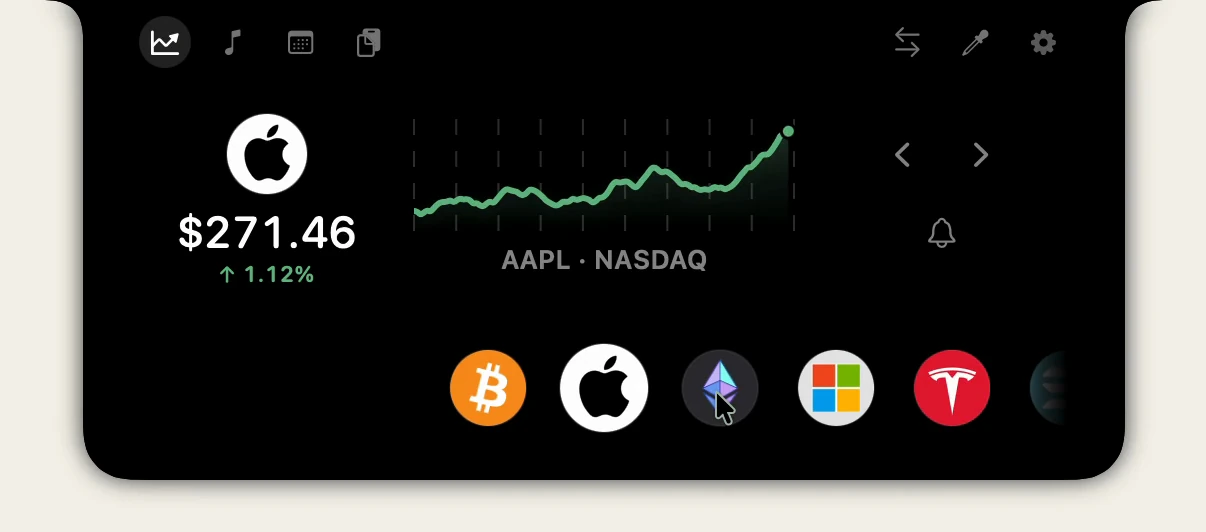
Markets shows one price large with a chart you can scrub, over a row of everything you follow. Click another one in the row, or use the arrows, to bring it up.
Step 2: Add coins
#Click + at the end of the row. The Add to Markets search takes a coin, a stock, an ETF or an index. Type a name or a ticker: “BTC” or “bitcoin” finds Bitcoin. Results say whether each is a coin, a token from a decentralized exchange, a stock, an ETF, an index or a fund, and where it trades. Click one to add it.
Coins listed on major exchanges come with a chart. Tokens that trade on decentralized exchanges are priced from their on-chain trading pairs, without a chart. You can also add and remove coins in Settings › Finance, under the watchlist, and drag them into the order you like.
Step 3: Add stocks by company name
#The same search finds stocks, ETFs and indexes. You don’t need to know the ticker: “Apple” finds AAPL, “SPY” finds the S&P 500 ETF, and “tencent” finds 0700.HK, Tencent on the Hong Kong exchange. Each stock keeps its own currency and shows its company logo where there is one.
Perchy knows the hours of the major US exchanges and of markets from Toronto and São Paulo to London, Frankfurt, Hong Kong, Tokyo, India and Australia. The stocks page lists them all.
Step 4: Read market hours, Closed and Delayed
#Stock prices update during each market’s regular session. After the close, Perchy keeps the closing price until the next session; there are no pre-market or after-hours prices. A label under the price says where it stands:
- Delayed: the market is open and its exchange reaches Perchy late. That is most exchanges outside the US, by about 15 minutes.
- Closed: the market is closed, and the price is its last close.
- Lunch break: the midday pause in Hong Kong, Tokyo, Shanghai, Shenzhen and Singapore.
- As of 14:02: Perchy could not update the price, so it shows the last one and its time.
Coin prices have no market hours. They refresh every 5 minutes on Free and every minute on Pro, and stocks refresh at the same pace while their market is open.
Step 5: Set a price alert
#Click the bell next to a price, enter a level, and choose whether the alert fires once or every time the price crosses it. Perchy waits for a second reading to confirm the cross, then shows the alert in the notch. When you save your alert, Perchy offers to turn on macOS notifications too, so alerts also reach Notification Center; without them, alerts still show in the notch. A stock’s alert is set in the stock’s currency.
Free keeps 1 coin alert and 1 stock alert on; Pro up to 20 coin alerts and 20 stock alerts. All alerts follow one switch in Settings › Price Alerts.
Step 6: Arrange it your way
#- Two sections instead of one: turn on Settings › Finance › Separate crypto and stocks, and Crypto and Stocks get a section each.
- A price in the closed notch: Settings › General › Closed notch shows picks music, prices, or music while something plays and prices otherwise.
- A display without a notch: Perchy draws a notch or a Dynamic Island-style island there. How to set up an island.
Free and Pro limits
#| Markets | Free | Pro |
|---|---|---|
| Coins | 2 | Up to 30 |
| Stocks, ETFs and indexes | 2 | Up to 30 |
| Price updates | Every 5 minutes | Every minute, or every 2 minutes |
| Coin charts | 1 day | 1H, 1D, 1W, 1M, 3M, 6M, 1Y, ALL |
| Stock charts | 1 day | 1D, 1W, 1M, 3M, 6M, 1Y, ALL |
| Coin price alerts | 1 on | Up to 20 on |
| Stock price alerts | 1 on | Up to 20 on |
| Converter (your coins and 30 currencies) | No | Yes |
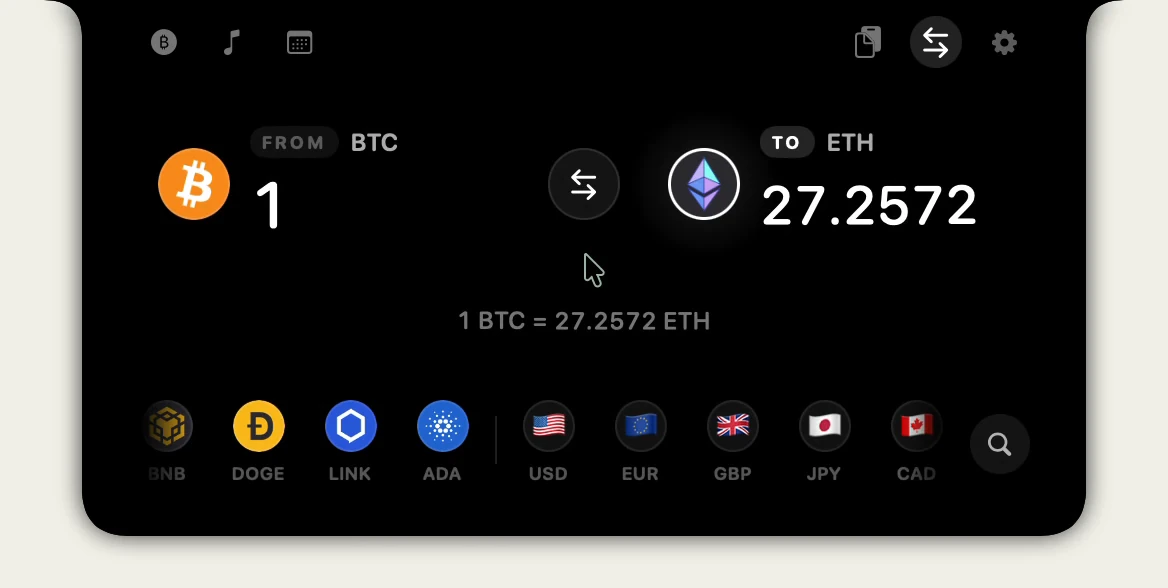
Perchy Free has no time limit. Every new Mac gets 24 hours of Pro, then switches to Free and deletes nothing: coins, stocks and alerts over the Free limits wait for Pro. Pro is $14.99, paid once, for 2 Macs (the launch price, then $19.99), with all chart ranges and up to 30 stocks.
Questions
#Are the stock prices real time?
No. Perchy updates stock prices every 5 minutes on Free and every minute on Pro while their market is open. Most exchanges outside the US reach Perchy about 15 minutes late, and those prices say Delayed.
Do I need an exchange or brokerage account?
No. Perchy reads public market data. It never asks for an account, a login, an API key or a wallet, and it cannot trade or move money.
Can I follow crypto and stocks at the same time on Free?
Yes. Free follows 2 coins and 2 stocks, counted apart, with 1 alert for each. Pro follows up to 30 of each.
Which currency are stock prices in?
Each stock keeps its own: Apple in US dollars, Tencent in Hong Kong dollars. A stock’s alerts are set in that currency too.
Does it work on a Mac without a notch?
Yes. On an iMac, a Mac mini or an external display, Perchy draws a notch at the top of the screen or floats there as a Dynamic Island-style island, with the same Markets section.
More on Markets, crypto and stocks in Perchy.
Not investment advice. Market data may be delayed.
Something out of date? Apps change. Write to support@getperchy.com and we will correct this guide. More guides.